Friday, 31 May 2013

The Periodic Table Of SEO Ranking Factors

SEO — search engine optimization — is one of the most important marketing activities available to companies and publishers, but it’s too often considered some murky “dark art” or a sinful practice that should be avoided. It’s not. To help clear away some of the mystery and fear for those new to SEO, and provide a “reset” for those who are experienced, we’ve created “The Periodic Table Of SEO Ranking Factors.”
Clicking on the image above will take you to where we’ve permanently housed the table, along with information on how to download it for yourself. We’ve also created a new Search Engine Land Guide To SEO, based on the table and explaining what it means in more depth.
As for this introduction to the table that you’re now reading, it’s meant to explain more about the “why have a table” rather than the “what does it the table mean.”

SEO: It’s A Good Thing!

As a reminder, SEO is not a crime, a harmful act nor something that only “bad” people do, despite what you may have seen on The Good Wife. It is, in fact, a helpful activity that even the search engines, including Google, recommend.
If you want to understand more about some of the myths of SEO being “bad,” I’d recommend the further reading below. Seriously, take some time to educate yourself:

SEO’s Fundamental Factors

SEO can be confusing to both new people and experienced folks alike. For new people, it can seem like rocket science, because you might get overwhelmed with all the details and miss the relatively easy general principles. For experienced people, chasing down which particular hot new SEO “tree” to climb can blind you to the overall forest that you should be considering.
The Periodic Table Of SEO is designed to visually present the major factors, the biggest and most important things that can help you in gaining traffic from search engines. It’s focused on traffic from web search results, though down the line, we might produce similar ones for more focused search engines such as video or local. By the way, the Local Search Ranking Factors survey from David Mihm has just been updated.
There are the “On The Page” factors, the things that a publisher can control directly. “Off The Page” factors, which are things you can influence indirectly about how others can help, or harm, your chances of search engine visibility. “Violations” are the things you should avoid, sometimes common mistakes that developers or others might not even realize shouldn’t be done. And “Blocked” covers a new class of not-violations but still things that can be harmful.

Focus On Most Important Factors

Within each of these major groups are individual factors. There could be many more individual factors than we show. However, we’ve made a deliberate decision to show only those we think are most important, most consistently seen used by search engines, or verified by SEO data or commonly accepted and easily implementable.
For example, in HTML factors, we recommend paying attention to:
  • Title Tags
  • Description Tags
  • Header Tags
We don’t try to get into whether a word you hope to be found for comes first or last in the HTML title tag. Or whether an H1 header tag carries more weight than an H2 header tag. We don’t suggest that you need to use bold text.
We avoid all that, because we feel it goes too much into unnecessary and possibly confusing depth for many people. Instead, if you know that your pages should have good, unique titles, that they should have structure that can be reflected by header tags, and that you should use the easily implemented description tag, you’ve probably covered 90% of the most important HTML-related factors.
In addition, some of the factors we list are more general goals to reach rather than specific factors that can be implemented. For example, our social factors include attaining a good social reputations and good social shares. A good social reputation on Facebook? Or Twitter? And social shares on both, or only one — and what about Google +1?
All of the above. Rather than getting lost on if Facebook or Twitter is better, or has more SEO juice, we want you to understand that social activity is increasingly having an influence on search rankings. So you want a good social reputation in a variety of networks. You want to be shared on a variety of networks. Those are among the most important general social goals you can go after.

An Overview Teaching Guide

If you want a deep-dive into those types of specifics, SEOmoz does a biannual survey of search engine ranking factors you should certainly read (it’s due to be updated very shortly). Our ranking factors table isn’t a replacement for that or others. Instead, we view it as a complementary guide.
In particular, I personally hope that it’s the type of thing that anyone versed in SEO can use to help someone else get up to speed on the fundamental building blocks. Have you done Cr, research into keywords? Here are some tools to help. Or that As — site speed — is important factor.
The factors are weighted on a scale of one to three, with three being deemed more important, though anything listed is deemed a fundamental. Not everyone may agree with how we’ve scaled things, but it’s a start. And everything’s relative. No single factor guarantees success, but having several of them increases the odds.

Blast From The Past

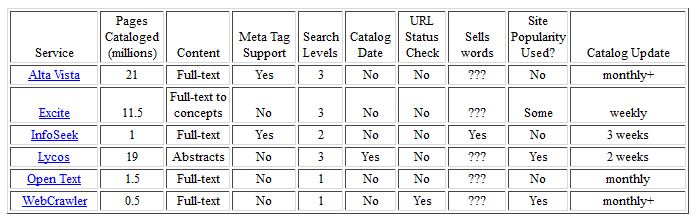
From a nostalgia perspective, I started writing about SEO over 15 years ago, with my first article going up in April 1996. It had an SEO ranking factor chart as part of it, which looked like this:

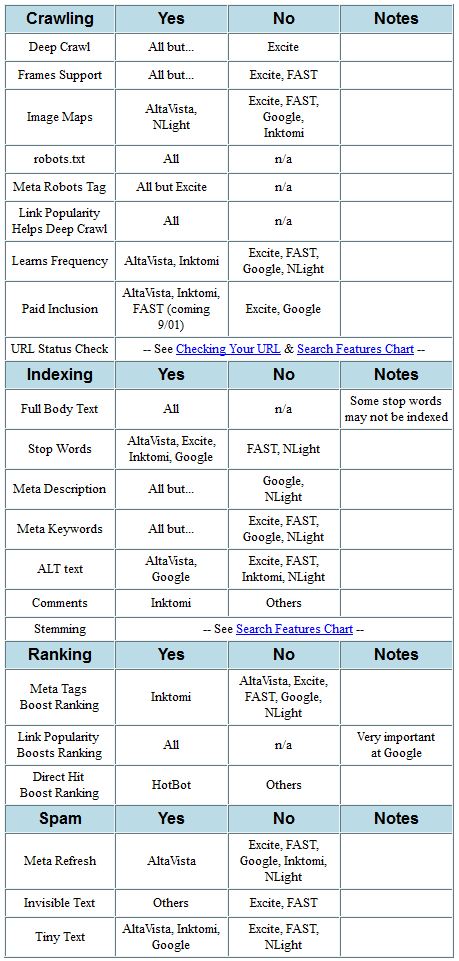
This grew rapidly by the following year, to cover issues such as whether frames posed a barrier to being crawled. Here’s only part of the successor to my original chart, from November 1997:

Here’s a version from July 2001, which makes me smile as I remember that for a short period of time, how a site performed in Direct Hit’s clickthrough measurements could have a ranking impact:

I stopped maintaining this type of chart in 2003. In part, it was because a lot of the major “signals” or factors used by the different search engines were becoming more and more the same. The world also became fixated just on Google, which in term was largely driven by rewarding those with the best links.
I found it nice to come back years later and think afresh about how I’d organize the factors. It was fun to put back on my graphics reporter hat, which I haven’t worn since I used to do infographics work in my pre-search engine life.
Of course, I’m not an artist. Turning the periodic table into a great visual concept was the work of the good folks over at Column Five Media, which has a wonderful portfolio of infographics. It was a pleasure to work with them. Special thanks to Jason Lankow and Josh Ritchie.
Also thanks to our technical director Michelle Robbins, who did a ton of last minute work to get the chart ready to go online here.
If you enjoy the chart, find it useful — please, reward our Cq with some Ln, Lt and especially Lq. Also appreciated is any Ss. Give us some Ce, too. Comments are more than welcome. And the best with your SEO!


Reference :- http://searchengineland.com/


EBriks Infotech :- SEO Company India    SMO Company India     PPC Company India

Address            :- E-171,Sec-63,Noida(U.P)India-201301

Disavowing Links? Google Says Use a Machete, Not a Scalpel

Google Disavow Links
When it comes to Google’s Disavow Tool, there was plenty of speculation and testing as to what approach to take. Should webmasters disavow everything and start clean? Disavow in small batches to see what would happen? Or just lump a large group of possible suspect links and disavow anything and everything that could possibly be an issue and wash their hands of a good portion of their backinks?
Well, according to Google's Distinguished Engineer Matt Cutts, which was shared by John Mueller, a Webmaster Trends Analyst at Google, webmasters should be tackling URLs for the disavow tool with a machete instead of a scalpel.
Hmm. One common issue we see with disavow requests is people going through with a fine-toothed comb when they really need to do something more like a machete on the bad backlinks. For example, often it would help to use the "domain:" operator to disavow all bad backlinks from an entire domain rather than trying to use a scalpel to pick out the individual bad links. That’s one reason why we sometimes see it take a while to clean up those old, not-very-good links.
With this confirmation from Cutts, it goes a long way in giving webmasters some guidance when it comes to how best to use the disavow tool in order to get a healthy backlink profile.
While the machete approach might seem extreme to some people, the fact that doing it with a scalpel-like approach can lead to a longer time frame to clean up a site might make it more appealing, and less scary, to webmasters.


 Reference :- http://searchenginewatch.com


EBriks Infotech :- SEO Company India SMO Company India  PPC Company India

Address              :- E-171,Sec-63,Noida(U.P)India-201301

Google Analytics Streamlines Goals

If you're a website owner who tracks visitors' actions using Google Analytics, you're likely using goals. Goals in Google Analytics are ways of tracking if a visitor performed an action that likely affects your bottom line.
Goals are often defined as a specific URL. If a visitor reaches that URL – typically a thank you page after submitting some sort of online form – then the goal is "converted."
Since website goals don't change that often, most site owners don't go into the admin area of their site's Google Analytics profile to redefine them. But the next time you do, you'll be in for a whole new experience.
Last week, the Google Analytics team announced a new, more streamlined way to measure your goals. From the visual layout of the interface, to setting up new goals and all the way through to reporting, working with your analytics goals has changed.

Setting up Goals in Google Analytics

Some visuals have been added to the new goal set-up procedure. The options haven't changed, only the presentation has.
goal-setup-template-google-analytics
The new visuals make it easier to go through the process step-by-step.
One new element to the setup process, however, is the use of goal templates. Just as the name suggests, you can use goal templates to make it easier for you to find and set goals that meet your organization's business objectives.
If you have selected an industry category for your organization in the your site's property settings, Google Analytics will suggest templates based on that industry. Google's goal templates are tailored to meet the needs of businesses within those industry categories.
Goal templates can be customized, but try to pigeon-hole into one of several template categories, depending on the industry you have selected.

Goal Verification - Making Sure it Works

The Google Analytics team has now included a feature called Goal Verification. This feature will allow you to test your goal set up, based on the previous 7 days' worth of data. This is significant because goals are measured starting from the time you define them. If you make a mistake defining a goal and someone converts what you wanted to measure, in the past you would have missed out.
Starting with this new feature, you'll be able to test your goal setup looking back over the prior seven days' worth of data. If you know a goal was converted, but the verification doesn't show any, you'll know you have to redefine your goal.
A similar feature has been available for quite some time for testing advanced segments. Now this preview will be available for newly created goals.

New Goal Reporting

The Analytics team also added new features to the Goals Overview report. You can now see how different goals relate to each other.
Similar to how you can overlay data sets using two different advanced segments in a graph, you can now overlay two goal completions on the same graph. This will allow you to better visualize potential correlations between goals or simply visualize each goals' performance over time.
goal-performance-over-time-google-analytics
The Goal Overview Report isn't the only report that's changed. The Multi-Channel Funnel reports have as well.
Multi-Channel Funnel Reports show a visitor's multiple visits through until conversion. Now they include off-site interactions a visitor may have had with your organization before completing an online goal. That, of course, depends on any external factors you may have to help collect those data.
As usual, the feature is just starting to roll out. If you don't see the changes yet, keep looking over the next few weeks. You will soon. When you see the changes appear, let us know what you think in the comments.


Reference :- http://searchenginewatch.com


EBriks Infotech :- SEO Company India SMO Company India  PPC Company India

Address :-              E-171,Sec-63,Noida(U.P)India-201301

Google's Matt Cutts Issues New Warning on Advertorials & Paid Content

Google's Matt Cutts Talks Advertorials
Advertorials have been popping up on websites with much greater frequency over the past year or two. Advertorials are essentially paid "content", whether articles or reviews, disguised to appear that they are simple editorials by someone who has used the product or service in question, and is writing about it without ulterior motives.
Google’s main issue with advertorials are the fact that the majority of these advertorials are not disclosed by the writers or webmasters, or if it is disclosed, it is done in such a small and unobtrusive way, that the majority of readers wouldn’t realize it is a paid promotion of some sort. They are pay for play types of content which has the unfortunate effect of misleading those who read it.
The issue became much better known in February, after a UK flower site, Interflora, embarked on a huge advertorial campaign with links that passed PageRank. While in that case, they were marked as advertorial content, the links to Interflora with keyword rich links to give them the maximum benefit of those links for search engine rankings. And when it came to light, Interflora was subsequently penalized, along with some of the newspaper sites who published those advertorials with straight links.
Even with the Interflora penalty, more webmasters have been utilizing advertorials and other types of paid promotional content for search engine ranking benefits, so Google's Distinguished Engineer Matt Cutts is bringing the issue up and alerting webmasters to what they need to know, so they can properly disclose advertorials without being penalized.
What are the guidelines webmasters need to know for advertorials and native advertising?
"There’s two fold things you should think about," Cutts said in a new video. "The first is on the search engine side of things. Search engine wise you should make sure that if links are paid, that is, if money changed hands in order for a link to be placed on a website, that it should not flow PageRank; in essence, it shouldn’t affect search engine rankings. That’s no different than the guidance we’ve had for many years and years and years.
"Likewise, if you are doing disclosure, you need to make sure that it’s clear to people," he said. "So a good rule of thumb is there should be clear and conspicuous disclosure. It shouldn’t be the case where people have to dig around buried in small print or have to click and look around a long time to find out, ‘Oh, this content that I am reading was actually paid.’"
The big thing Google wants webmasters to do is to ensure that if those advertorials are paid for, that you use a rel="no follow" so that those links don't pass PageRank, just as you would for any paid links on your site. Advertorials shouldn't affect search engine rankings in any way.
Secondly, ensure that promotional content is clearly disclosed, and not hidden away in tiny text that no one would ever notice.
While this isn’t a new policy by Google, Cutts noted that many webmasters aren’t doing it correctly – or more likely, hoping to get away with it. He also alludes to the Interflora advertorial penalty in the UK, that saw the advertorials with keyword rich backlinks.
He also mentions that the same thing applies to Google News, and they also blogged about it recently. Google News will remove paid content, but can also remove the entire publication from Google News as well.


Reference :- http://searchenginewatch.com


EBriks Infotech :- SEO Company India SMO Company India  PPC Company India

Address :-               E-171,Sec-63,Noida(U.P) India-201301 

Friday, 17 May 2013

Get Email Alerts for New Backlinks with Open Site Explorer

Recently SEOmoz added a new function to their Open Site Explorer called Just-Discovered Links. Instead of having to wait for new index updates and comparing your CSVs, you can simply monitor the new links tab. Unfortunately SEOmoz doesn’t have RSS support for Just-Discovered links. And checking for page updates every day is probably not the best use of your time.
In this YouMoz I'll demonstrate a quick and easy way to monitor new backlinks to websites. I've set this up for my own site, but also my competitors. It shouldn't take you more than 30-45 minutes to set up, and it will save you a lot of time.
What we will be doing is creating an RSS feed for that page and then sending an email for every new feed item. Don't worry, we will use free tools to accomplice this. No programming knowledge needed.

Step 1) Get the URL

Personally, I would like to be know every external new link to a website (root domain). For that, use the URL below. Replace www.example.com with the domain of your choosing.
http://www.opensiteexplorer.org/just-discovered?page=1&site=www.example.com&sort=crawled&filter=&source=external&target=domain&group=1
Of course you can change this to fit your needs.

Step 2) Creating an RSS feed

To get around not having an RSS feed, I use a service called Page2RSS. You simply enter a page URL and this website does all the magic for you. It’s free and doesn’t require an account. It’s not perfect; there are no instant updates and sometimes feed entries are blank. Still, it works just fine for this particular job. With this feed I use another free service to email every new feed item.
Now, the most important part is being notified of new links. For this, we will use IFTTT.

Step 3) Setting up email alerts

IFTT (if this then that) is a online service that lets you create triggers. For example, you can ask to be sent an email if it’s going to rain tomorrow. Or tweet ‘Happy New Year’ at New Year's (more ideas). You can also ask it to send you an email each time a RSS feed is updated. This is what we are going to use.
For feed URL enter the RSS feed you created in step two. Instead of an email you can also use other channels as well, like Twitter. You can then adjust the email to your needs. Make sure to enter the name of the website you are monitoring in the subject. This makes for easy filtering in your email service later.


This is a quick workaround until SEOmoz adds RSS support. Hopefully, they’ll even add email alerts!


Reference :- http://www.seomoz.org/ugc/get-email-alerts-for-new-backlinks-with-open-site-explorer

EBriks Infotech :- SEO Company India SMO Company India PPC Company India


Building a Freelance Link Building Team


Need help link building, but can’t afford to hire an agency or a full-time employee? There are some great resources out there that can connect you with qualified freelancers to help you meet your goals. The trick is knowing what to look for in freelance SEO help. Unfortunately, there are a large number of "SEOs" that deliver low-quality and/or out-of-date strategies that will not help your site, and at the worst could actively hurt your site’s rankings. In this post, I am going to describe some best practices for finding quality freelance help for link building through oDesk.
oDesk is a service that connects companies or individuals with contractors in a variety of marketing mediums, one of which is SEO. Through oDesk you are able to post a job description, hire help, manage the time they work and pay your freelancers. I am not a representative of oDesk or affiliated with them in any way; I have simply used it successfully over the last two years to help me build my start-up marketing agency.

Set Your Budget and Goals

The first step is to set your budget and goals for the project. If you are a small agency hopefully you would have planned this out during the pitch for a new client and if you are an in-house team you will need to get buy-off from internal stake holders. Either way, having a budget of $200 per month vs. $1000 per month will dramatically affect how you divide the hours spent on various projects and how much you are willing to pay each freelancer.
During this process you will also want to determine what type of link building you will need for the project. The reason this is important is because different link building techniques require different levels of competency and capability. So, some link building techniques will cost more than others based on the skill level of the freelancers that will be hired for the work.
For this post, here is the list of link building techniques that we will be finding help for:
  • Guest Blogging
    • Writer, Researcher and Project Manager
  • Local and Business Directory Submissions
  • Blog commenting

Map Out the Desired Freelancer Qualities

This is where you are able to build in a lot of budgetary efficiencies. I would highly recommend hiring several freelancers in order to complete all of the necessary work.
For example, I would hire 2-4 people to cover-off on my Guest Blogging line item. I would look for 1-3 writers and then I would find someone else that will act as a project manager (oversee writers, find the posting opportunities, reach out to the potential blogs, etc.). These skill sets require different types of people. A decent writer with experience in the niche you need content for can generally be found for $20-$50/hour. A good researcher and project manager can often be found for $15-$25/hour. However, when hiring the project manager you really want to do your homework on them (A Skype interview is recommended) to make sure you find someone capable.
Then for directory submissions and blog commenting you can look for freelancers that charge lower hourly rates. This is fairly simple work; it is just time consuming. I would look for a freelancer at a rate of $5-$15/hour. Sometimes you can find a contractor from India or the Philippines that can perform this work successfully or you can find an entry level North American SEO at an affordable rate. I would always recommend native English speakers first if you can afford it.

Post a Job

Once you have your budget set and list of link building needs, then you are ready to go! After you create a profile on oDesk.com you can navigate to the “Post a Job” section. Be as detailed as possible in this section and make a case to the potential freelancers for why they would want to work on your project.

Suggestion
I have noticed that it is very helpful to ask for some type of action from the applicant. There is potential to get a large volume of low-quality applicants, but if you ask them to do something when applying it is easy to sift through the applicants to see who took the time to tailor their application to your job posting.
You will begin to receive applications pretty quickly, so once you have had a chance to look through them it is time to follow-up with the applicants. Before hiring someone it is good to message them with a secondary question or task to gauge their capabilities and response time. You want to find a freelancer that will respond to your emails and work requests the same day you send them, so the application process is the best way to see who is quick and who is not.
*Note: You are able to counter-offer the hourly rate the applicant has provided. I have noticed that most are willing to come down a little bit from their initial offer. And, if they aren’t it was at least worth a shot.

*This is the screenshot from an old job posting for a copywriter, so you can see the large volume of applicants. Please disregard the date since they applied. I filled this position within a week of posting the job!

Set Strict Goals

Now that you have hired your team of freelancers you are ready to go! It is crucial to the success of the project that you provide straightforward and attainable goals for your freelancers. Tell them exactly what you want. When dealing with freelancers you want to spell out your requirements as plainly as possible so that all parties involved know what to expect.

Managing Workflow

oDesk offers a simple to use interface that tracks all hired freelancers and the number of hours they have worked on a given project. oDesk also takes periodic screen grabs of your freelancers computer screen, so you can see exactly what they were doing. It is a very transparent process.
If oDesk and Excel are not detailed enough for the link building work you require, then you can easily have your freelancers work in project management systems such as Buzzstream or TeamBox.

Regular Reporting

As a part of your goal setting, make sure to establish guidelines for the frequency and type of reports that you would like to receive. For link building I prefer monthly reports showcasing the links that have been prospected. However, for large volume projects you may need more frequent reports or you can ask freelancers to track progress in Google Docs, so the progress is shown in real-time. This reporting can also be leveraged for the reporting that you provide to your client or boss.

Build Those Links!

And now you can rinse and repeat. This process is easy to scale up or down depending upon your link building needs at any given moment. You are able to find freelancers that will work a few hours a month all the way up to nearly full-time employees. Utilizing oDesk for finding talented freelancers has allowed me to offer large agency quality work out of our boutique agency. Good luck with your next link building project!


Reference :- http://www.seomoz.org/ugc/building-a-freelance-link-building-team

EBriks Infotech :- SEO Company India PPC Company India SMO Company India 

Google Alerts VS Mention VS Talkwalker

Google Alerts VS Mention VS Talkwalker
This is a detailed comparison of Google Alerts vs. Talkwalker vs. Mention. The analyses was performed on three key points:
  1. Amount of Alerts Delivered
  2. Quality of the Alerts
  3. Speed of Delivery
This is probably the most detailed comparison of Google Alerts vs. Mention written to date. Read the conclusion at the end of article to see which service I picked as the winner and why.

Total amount of delivered alerts:

talkwalker mention and google alerts compared in terms of total quantity
Talkwalker pulled in the biggest amount of alerts: 391.
Second place goes to Mention.net which delivered 249 alerts, but if I would have included Twitter and Facebook results that amount would be close to 600.
Least and last was Google Alerts which pulled a total of 126 alerts. The only instance when Google was able to beat both Talkwalker and Mention.net is when it came to keyword number 6. This keyword was somewhat related to the recent "Boston marathon incident". It's as if Google Alerts was better suited to deliver alerts that come from News Sources.

Quality of the alerts:

talkwalker mention and google alerts comparison of quality

Google Alerts:

Quality sites: 82 out of 89 were high quality
Source of alerts: Almost all of the alerts came exclusively from news sites
Conclusion: 92% of alerts came from quality sites, but almost all of them were news site, which means that important places like blogs, forums and personal pages were ignored.
I would occasionally come across a few blogs, but it didn't alert me of any forums (except for hybrids like "topix") and it completely ignored places like Yahoo answers, Twitter and Facebook, which is surprising, but for some reason there were no notifications of Google+ articles either. In this regard I would say the quality of the alerts was pretty high, but only because Google Alerts delivered results from a News sites. At times Google Alerts would notify me of the same exact URL 3 times in a span of 2 days, but this wasn't the norm so it's not a big issue.

Mention.net:

Quality sites: 133 out of 158 sites were high quality
Source of alerts: About 40% sites/blogs, 40% news sites and 20% forums
Conclusion: 87% of alerts came from quality sites
On several occasions I saw mention deliver results which did not contain the keywords entered into the alerts. It seems as if the keyword was dynamically generated and must have been present when mention initially crawled the site. The result is pages that have nothing to do with your alert.
Also mention returned pages which had my alert keyword inside their navigation. The keyword would be in either "tag cloud", "recent post" etc. but not within the body of the article which means that the actual page on which I landed was unrelated to my alert. I'm sure with some minor tweaking the Mention team could fix this. On the other hand mention.net did not notify me of web sites that had my keywords in the comment section, which would indicate that they have a feature in place that eliminates these alerts (unlike talkwalker).

Talkwalker:

Quality sites: 44 out of 121 were high quality
Source of alerts: Mostly blogs and strange wikis, with about 20% news sites
Conclusion: 36% of alerts came from quality sites. Extremely low quality results for three out of five keywords. In addition it failed to find high quality web sites that other services were able to find. All in all, only one out of three alerts came from quality sites.
Talkwalker's quality is hard to categorize because keyword number 5 and 6 produced spotless results. Almost all results were delivered on time and quality was good (almost all were news sites).
Unfortunately for keywords, 1,2,3 and 4 the results were as follows:
After reviewing the initial five results returned by Talkwalker I started getting worried about the safety of my computer. Many of the results were spam pages and at one point my browser (Opera) crashed because of some unknown Java script. A large chunk of the results were returned because people left spam comments containing my keywords, ironically it was spam comments on spam affiliate "blogs". From the looks of it they were blog networks. On the other hand it did manage to capture a few good results which other resources were not able to catch. But those results are definitely not worth the sheer amount of low quality pages that Talkwalker sends your way.
For this experiment I was using their free version, so I'm not sure if there is a way to filter sites in the paid interface.

Speed of the alerts delivery:

talkwalker mention.net and google alerts compared in terms of speed
IMPORTANT: I wasn't using any quality filters when performing the test. All keywords are raw and each service was supposed to deliver the same quality keywords ("anything goes" in this case).

Mention.net:

Alerted on the same day: 130 out of 158
Delivered alerts on the next day: 21 out of 158
Delivered alerts late (over 1 day): 7 out of 158
Conclusion: Roughly 82% of alerts were delivered on the same day the text appeared on the net.

Talkwalker:

Alerted on the same day: 94 out of 121
Delivered alerts on the next day: 14 out of 121
Delivered alerts late (over 1 day): 13 out of 121
Conclusion: Where Talkwalker lacks in quality it makes up in speed of delivery. With 77% of alerts being delivered on the same day your keyword was published.

Google Alerts:

Alerted on the same day: 51 out of 89
Delivered alerts on the next day: 25 out of 89
Delivered alerts late (over 1 day): 13 out of 89
Conclusion: Google alerts is the slowest of the 3 services. Only 57% of the alerts are delivered the same day your keyword appears on the internet.
For some keywords Google Alerts would be remarkably fast, delivering the results on the same day as the keyword is mentioned. While in other instances there would be a week and a half delay.

How the experiment was performed

The experiment spanned across three days: 15th, 16th and 17th of April 2013. I used a total of six keywords to perform this experiment. I did NOT include any filters, so in Google Alerts I would select "Everything" and in Mention I would not apply any filters. The only type of filtration used was to take out two websites that continuously pump out articles which trigger alerts, so as to avoid clutter I have blocked them out. All three services offer an option where you can exclude certain web sites. All keywords were in quotes when I put them in Google Alerts and Talkwalker, I wasn't able to do that in Mention since it throws an error when it sees quotes.
How I did it: On the 18th of April I analyzed a maximum of 180 alerts per service. I would analyze 30 sites, per keyword per given date. For example for keyword A in Mention.net I would look at the 30 results delivered during the 15th, 16th and 17th. That means I looked at 30 results per day. Since there is six keywords that makes a maximum of 180 alerts per service (in this case Mention, Talkwalker and Google alerts). Most of the time it would be less because Google Alerts would deliver below 30 results per given keyword.
I looked at the type of results each service returned. Were they duplicate results? Where they coming from quality sources or doorway pages, MFA (Made for Adsense sites) and RSS aggregators? How quickly did the service deliver the results. For example if I opened the alerts delivered on the 15th and found out that a news article it had sent me to was published on the 12th, I would mark it as having arrived three days late.
I wish I could reveal the actual keywords used, but a signed NDA is... well a signed NDA. I sent my keywords to the SEOmoz editors and also offered to login to my Google Alerts, Mention and Talkwalker accounts to verify the data. The keywords are related to telemarketers and unsolicited phone calls in general.

Conclusion:


None of the services had a flawless performance, but in my view Mention.net came out on top.
It delivered less results than Talkwalker, but majority of Talkwalker results were from low quality properties.
In terms of quality Mention.net had a lower percentage of high quality sites than Google Alerts, but almost all of the Google Alerts come from News sites, which means that it often ignored forums, personal pages and blogs.
As for the speed of delivery Mention.net was the fastest. Mention.net also has a nice feature where it give you a preview of the results on the right part of the screen. The only drawback is that if the web-site contains malicious code it will also come through Mention.net interface, I wish they would have just taken screenshots of the web-site, this way I can see if I want to visit it or not, oftentimes spam pages are easily to identify just by looking at them. To make things worse Mention doesn't show you the full URL (which can oftentimes also tell you if a web-site is spammy or not), you are literally forced to click on a result to find out what it is. Talkwalker on the other hand will show you the URL of the page that contains your result.
I think it's best to use a combination of Google Alerts and Mention, I would also include Boardreader into the mix which is an excellent tool for monitoring forums. You can subscribe to a keyword alert inside boardreader via a RSS feed and then plug-it into your RSS reader along with Google Alerts RSS feeds to have an even more complete list of results.


Reference :- http://www.seomoz.org/ugc/google-alerts-vs-mention-vs-talkwalker


EBriks Infotech :- SEO Company India PPC Company India SMO Company India