Friday, 7 June 2013

8 E-Commerce SEO Tips Gathered From A Decade Of Consulting

In the comments of my last column about how I doubled e-commerce revenue for clients by focusing on user intent, readers asked for some more specific e-commerce SEO tips that they could apply in their own client work.
Today’s article shares some valuable lessons gathered over a decade of SEO work for e-commerce clients. These 8 e-commerce SEO tips have the power to transform any online business and boost profits.

1. Understand The SEO Impact Of Information Architecture & URL Structure

E-Commerce SEO Tip #1
Like most SEO consultants, I am often contacted late in the Web development process, well after information architecture and URL structure have been determined. Generally, the site is almost ready for launch at this point — or, in some cases, already launched!
If so, it is an SEO nightmare. Content has been created. Product catalogs have been imported. Search engines have crawled and indexed the site. Prospective buyers are arriving. And, the internal structure — from an SEO standpoint — is a mess.
Without a proper URL structure, internal pages are competing against each other rather than strengthening the overall site. Duplicate content issues run rampant, thanks to URL parameters, session IDs and printer-friendly versions. Advanced filtering and search functions, intended to enhance user experience, actually end up compounding this problem.
Usually, the store owner hires a company to flesh out a design, implement and code special functions, and upload the finished site — all before the project itself has been finalized. Things then go in many different directions; and at some stage in the process, they decide to call in a consultant to slap on “SEO magic.” They’ve heard that SEO is very effective at driving more traffic and want to try “every little bit that may help.”
This is the most frustrating part of being an SEO consultant. We’re called in too late. A lot of adjustment and re-coding is required. Even then, some online stores won’t be able to meet the market’s needs without a complete make-over of the website. This is time consuming and expensive.
E-commerce SEO Tip #1: Get your Web designer, information architect and SEO consultant working together right from the beginning. The result will be a more effective, better-optimized website that is easy for prospective buyers to use.
My fellow columnist Tom Schmitz offers some great advice about Web structure and internal linking in his recent post. I delved deep into this in one of my previous columns, with practical suggestions on how to structure content for e-commerce sites.

2. Recognize Causes For Duplicate Content & Find Solutions

When I analyze sites for new SEO clients, they often have serious duplicate content issues. Fixing this can be complicated without modifying the entire design and code.
Duplicate content issues are usually the result of poor planning, careless information architecture and non-intuitive website structure.
The use of URL parameters, session IDs and printer-friendly content versions are common culprits in e-commerce store websites. The situation gets muddied even further when identical content is published under multiple categories such as [campaign] or [offers] in addition to their regular place in the content hierarchy. These unique scenarios must be recognized and prevented proactively in the planning phase itself.
E-commerce SEO Tip #2: Before they start coding, make sure that developers are aware of the potential for duplicate content and how to resolve these issues.
Both designers and developers must be familiar with the pitfalls of related issues such as advanced search and filtering, the robots.txt file, and the relative merits and risks of meta directives or robot exclusion (including when not to use them!). Pagination is another potential quagmire; and, it is especially important to ensure correct implementation of pagination attributes for Google.

3. Don’t Waste Link Authority On Ineffective Link Structure

Effective link structure for an e-commerce SEO project depends upon information architecture, URL structure, and the manner in which products are categorized and organized in your e-commerce store. If your structure is poor, with products arranged in a haphazard manner instead of being in logical categories or sub-topics, your link architecture will be ineffective from an SEO standpoint.
E-commerce SEO Tip #3: Organize products in an e-commerce store by category and sub-category, based on topics and sub-topics, in a way that is reflected in your URL hierarchy.
Doing this enhances your e-commerce website’s optimization and improves usability for human visitors. Whenever new products are added to a sub-category, your breadcrumb navigation trail ensures new links to each level in the URL hierarchy, all the way back up to the category page and home page. By employing sub-navigation menus within specific categories, you can link to other relevant categories higher up in the structure.
With good keyword analysis and by planning exact match anchor texts, you will practically set your internal link building on auto-pilot. Each time you add a new product page (e.g., for a new pair of running shoes) to your site, you’ll not only boost the [shoes/running-shoes] level of the URL, but simultaneously pass along link juice upward in the hierarchy to the [shoes] category, as well.
Section/category level menus that link to relevant categories ensure that Google’s crawlers can find their way to all sections of the site and see pages in context with other content to easily decide how to rank them.
It is best to avoid mega-menus and drop-down menus which cause a flat URL structure and sometimes link to less relevant parts of the site, thereby leaking authority, power and Page Rank.

4. SEO Automation Can Be A Good Thing (Sometimes)

The word “automation,” when associated with SEO, produces negative connotations. Typically, I would shun anything to do with “automation” of SEO; but, there are some exceptions where it is important to facilitate automation. One such exception is a situation in which you have programmers who can automate on-site elements (such as title tags) based on a format determined by the SEO consultant.
In e-commerce stores with thousands of products, this practice will come in handy. Elements like title tags can be automated to present extremely user-friendly information while including the right target keywords.
E-commerce SEO Tip #4: While working with large e-commerce sites, provide developers with information about how to automate the creation of SEO-friendly title tags and meta descriptions for new pages.
This will save everyone time in the long run — so getting it right is important, even if it takes longer than you would typically spend on title tags. Remember, this deployment will be site-wide. Your instructions must clearly tell the developer how the title tags and meta descriptions should be worded, based on the content displayed on a product page of the e-commerce site.
Using the individual product name or title in H1 tags, as well as in the title tag, is one simple way to achieve this, and your developer can program it quickly and easily. You can also dynamically create meta descriptions for each product page by gathering text from the page’s content itself.
This is a good beginning, but there’s more to do. Rich snippets help increase CTR on search results pages, and with your help, a developer can provide excellent titles and meta descriptions even without any SEO knowledge.

5. Smaller Iterative Processes Are Super Effective

Fail to plan, and you plan to fail. Your SEO strategy is all-important. But, when working on tactics and implementation, one factor matters more than anything else — and that is “starting small.”
Too often, e-commerce site owners want to change everything at once. Transform the site. Make all pages rank high on Google. That involves doing too much, and taking too big a risk without knowing if it will work at all.
E-commerce SEO Tip #5: It is infinitely more effective to run smaller processes that focus on a limited portion of the site.
Test the change. See if it works. When you know what to do and how to do it, roll out the change across the site. Start with the most important things first. Most developers and designers have limited time. If the work is outsourced to a third party, they most likely use scrum or similar systems and timing is important. Handing them one task at a time usually results in quicker progress.

6. Implement E-Commerce Tracking

Many website owners look at traffic growth as a good sign that they are moving in the right direction and that they are doing something smart and effective. But, what if the traffic doesn’t convert into sales?
E-commerce SEO Tip #6: Turn on e-commerce tracking with Google Analytics to show exactly how much money you are helping clients make.
Most of my clients are already using Google Analytics. As one of my first actions as a consultant, I ensure e-commerce tracking is configured and implemented. This will reveal the profit boosts generated with my SEO improvements. Showing results in dollars is much more effective than increasing pageviews, rankings or clicks. Cash is king.
Dealing with clients is much easier when you don’t have to keep on selling them on the value of your services — after all, your client is better served when your energy and attention are focused on higher priority activities. E-commerce tracking is also a great way to quickly identify areas where the client’s online (or offline) marketing is not effective or adding enough value to the business.
Armed with data, I can position myself as being more valuable to the e-commerce business’ bottom line, instead of being perceived as just a “Google-fixer.” I get more billable hours, and the client stops worrying about how many hours I spend — because each of them brings in a high ROI. It’s a win-win situation.
When you outline a plan to increase revenue by 100% over the next 12 months, and then implement it while sharing your progress in Google Analytics, you will get the support and buy-in necessary to execute your proposed plan and carry it through to completion. Your budget will be sanctioned without protest, because who doesn’t like the idea of earning $10 million for an investment of a mere $100,000.

7. Traditional SEO Is Still Relevant To E-Commerce SEO

Yes, old is gold. E-commerce sites often under-perform on product pages. This might be traced to problems with coding, text, and other content. There may be too little product information, or a lack of unique content, or duplicates of material found elsewhere on the site.
E-commerce SEO Tip #7: Without product text, it is almost impossible to rank and drive organic search traffic to e-commerce websites.
You need content. Without images, video and proper keyword targeting, it is next to impossible for your client to compete in a tough niche. There are many guides to help you and checklists to follow to ensure you’ll get it right.
For starters, avoid re-publishing content from elsewhere on your site or from other online resources (including competitor and vendor websites). Google frowns on duplicate content, and your e-commerce site will not rank well.

8. Create Dashboards — And Report In Cash

It is hard to convince clients with just flashy pictures and showy graphs or charts. You can talk about visits, clicks and views till you’re blue in the face and not make an impact on hard-nosed business owners. Many of them won’t even understand what you’re saying, and this means you’ll have to work hard to win credibility — and retain your budget.
E-commerce SEO Tip #8: Make a dashboard in Google Analytics, and show them how much money you have helped them earn through your SEO efforts.
Compare it against earnings from other elements of their marketing mix. Proving that your SEO efforts are bringing in the dollars is key to winning repeat business. Construct your dashboard to report the most important numbers.
Focus on cash. That will strengthen your position in the client’s eyes. They will see you as someone higher up on the food chain, one who deserves higher priority. No longer will they see you as “just that SEO guy (or gal).”
Good SEO consultants are decent Web analysts, as well. But, clients don’t know it. Using dashboards, I can reduce (or even eliminate) time wasted on creating slides or spreadsheet presentations to convince clients of my value. This frees up time to spend on more valuable activities that further increase the profit I can generate for clients.

More Big Lessons & Takeaways

  • SEO is not icing on the cake to be slapped on at the very end. It must be baked into the makings, because it’s an essential ingredient.
  • There are no out-of-the-box, ready-made SEO optimized e-commerce platforms. The “SEO-friendly” ones just allow tweaking and optimization by SEO experts after they are installed and configured.
  • SEO is not a quick fix. Clinging to this belief can cost you many lost sales.
Now that I’ve shared some e-commerce SEO tips gathered over my experience working with many large clients, I’d love to hear from you on this issue, as well.
  • What do you think about these tips?
  • What are your most effective e-commerce SEO tips?
  • What are your biggest challenges in working as an SEO consultant with e-commerce clients?
  • And finally, are there any other questions you’d like to have answered?
Please share your thoughts, suggestions and comments below, and let’s have a spirited discussion about effective e-commerce SEO.

Reference:- http://searchengineland.com

EBriks Infotech:- SEO Company India SMO Company India  PPC Company India

Address:- E-171,Sec-63 Noida(UP)-India-201301


You Find Me On This:

Wednesday, 5 June 2013

10 Video SEO Tips To Improve Rank and User Experience

show that 17% of people spend less than four seconds on a website, but they are willing to spend 2.7 minutes watching a video online. Knowing that the average television commercial is 15-30 seconds long, think of what you could do with the attention-span-eternity that is 2.7 minutes of video engagement gold.
Video is powerful.
But if a video plays and no one is there to hear it, does it make a sound?
This post covers in short-form (because I know I’ve only got your attention for four seconds) 10 video SEO tips to help you create content that gets views — from taking into consideration quality and substance, to making sure your videos are seen and indexed by search engines so that they can be seen and shared by humans.

Focus On Quality

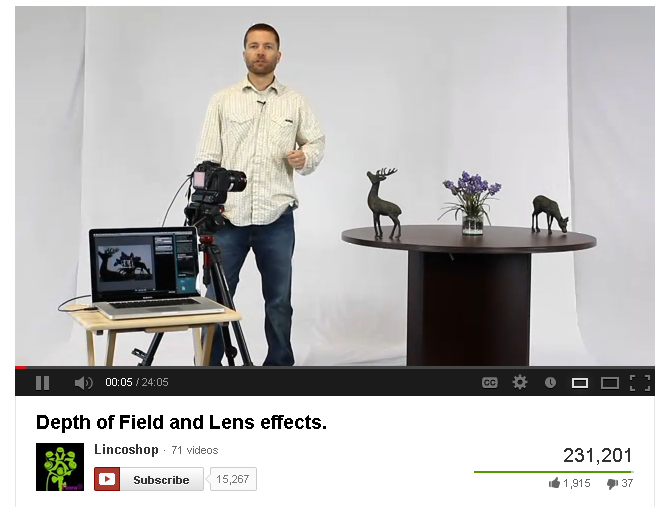
YouTube video still image featuring a man and a photography set
This photography tutorial offers a good example of a video set that is thoughtful and engaging. It’s important to create engaging video experiences like this if you want to see 231,000 views.
1) Focus on people first:
Before we start listing off ways to drive people to your content, it’s important to reiterate that you need to be proud of the content you’re driving them to. If your video has poor sound quality, or a script that sounds like you just woke up with a hangover and recorded this video while you were drinking a Bloody Mary, you’re not going to keep them for 2.7 minutes. You don’t want them to stay because your video is a train wreck and they can’t look away. For better or worse, the video content you publish inevitably represents your brand, so make it better not worse.
2) Likes, Comments, and Shares matter: High-quality, benefit-driven, video content that keeps your viewer engaged means more Likes, Comments, and Shares. More engagement means more people are seeing your content, not only through direct viral sharing, but also in the SERPs as both YouTube and Google use engagement to help them identify and deliver quality content.

Use Your Words: How To Optimize The Language You Use

3) Perform keyword research: Google reads words to discern what content is about, so using exact search query phrases to describe your content will go a long way in helping to get your content ranked on page one. Learn how to research keywords, pick one keyword phrase to target per video, then put your keyword phrase in your video Title, Description, and file name (ie: keyword-rich-name.mov).
Example of incorrect closed captioning in a YouTube video
Make sure to review and edit the captions YouTube creates for your videos. In this example you can see YouTube misheard the speaker saying “popular to this day” as “popular Tuesday.
4)  Write a script and upload a transcript: Google will read the transcript of your video so make sure to write a script for your movie and actually say your keyword phrase in the movie. While there’s no rule of thumb about when to mention your phrase, earlier is always better than later.
5) Use YouTube Captions as a transcript alternative: If you don’t have the resources to create a video transcript from scratch, YouTube can generate crawlable closed captioning for your videos. If you take advantage of this tool, make sure you review the captions YouTube generates and make edits as needed.

Use YouTube to Host and Embed Your Videos

6) Host your video on YouTube: YouTube is an easy to use free space to host videos, and it also happens to be the second largest search engine. If you want your video content to rank in Bing (269 million searchers per month), it makes sense you should also want to rank in YouTube, which now sees more than 1 billion unique users every month.
7) Embed YouTube videos on your website: If you want to rank well for a video in Google or YouTube it is worth your time to create a rich-media content page on your website to support the embedded video. The content landing page should include your embedded video, as well as text and still images that describe or supplement it.
Diverse, rich-media landing pages are engaging, offer a strong user experience, and give Google a lot of context that helps improve your SERP rank. Embedded YouTube videos can also help improve your YouTube SERP rank as number of views is a YouTube ranking factor and video views received on your landing page count toward your overall YouTube video view-count.
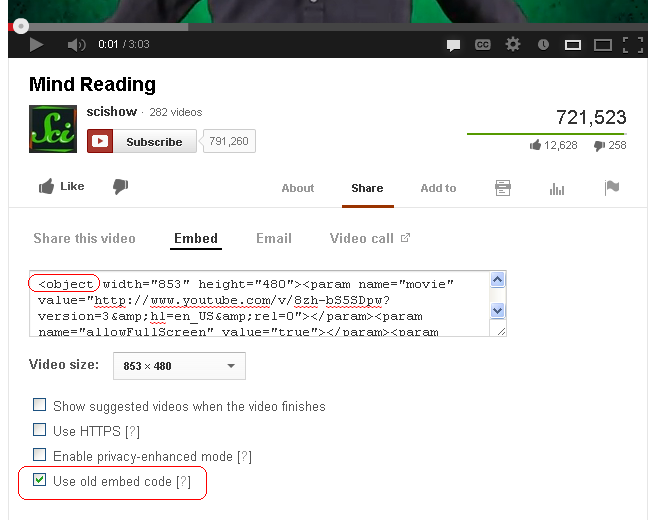
Using the YouTube old embed code
To ensure your videos get crawled, make sure to embed movies using the “old” YouTube embed code.
8) Use the “old” YouTube embed code option: When you select the Embed option in YouTube you will see the formulated code, a Video Size pull-down menu, and four preference options; the last of these four preference options says “Use old embed code.” If you embed a video on your website or blog, make sure this option is selected. The old embed code gives you an <object>-based embed code that can be crawled naturally by search engine spiders (as seen right), while the new embed code puts your movie into an iframe that renders your movie uncrawlable.

Get Technical: Sitemaps and Schema

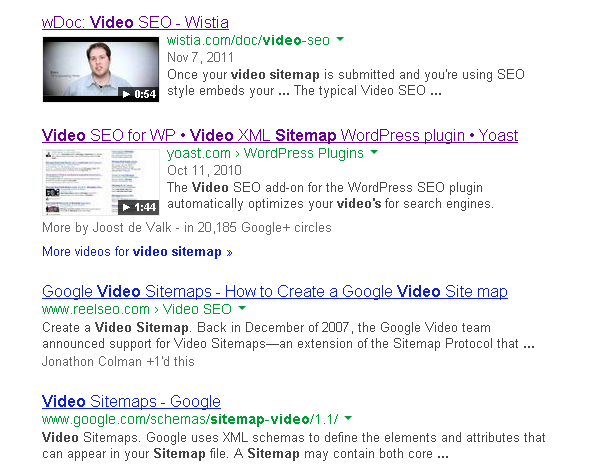
video-sitemap-serp-examples-crop
In this example the first two websites have video Sitemaps submitted, and accordingly, video thumbnails that show up in the SERP results. As you can see, the video thumbnail really makes the entries stand out in the listing.
9) Create video Sitemaps: If you include a video on your website, creating and submitting a Sitemap for that video will make it easier for search engines to find and index your videos; return SERP results that lead people to watch the video on your website, rather than YouTube; and improve the visual presence of your SERP listing with the addition of a video thumbnail.
Creating a video Sitemap is something that anyone can do using any number of video Sitemap generators and Google Webmaster Tools. If your video is self-hosted, check out how to create a video sitemap at Google Webmster Tools, or learn how to create a sitemap for an embedded YouTube or Vimeo video at the Moz blog.
10) Use Schema.org markup: Schema is a form of microdata HTML markup that provides additional information and context to search spiders. Google has called Schema “the recommended way to describe videos on the web,” and as such, is a recommended addition to help make your video content fully optimized and accessible to search spiders. Learn how to use Schema.org for video.

Paper that reads "Ask and ye shall receive! Maybe"


The Tip Of The Iceberg…

Video marketing is a vast industry that could easily merit a few thousand words. I’ve tried to keep it brief in this article, but I would love to know what questions you have. Leave your video SEO questions in the comments section below and you may get one of my world-famous 600-word comment responses, or even a blog post dedicated to answering your question in depth.


Reference         :- http://www.bruceclay.com

EBriks Infotech :- SEO Company India   SMO Company India   PPC Company India

Address            :- E-171,Sec-63 Noida(UP) India-201301


Bing Ads Now Has Time Saving, Pre-Formatted Excel Reports

This is one of those minor features that will bring a smile to any PPC manager’s face. Microsoft has added Excel to the output options in the Bing Ads report center. But that’s not the exciting part.
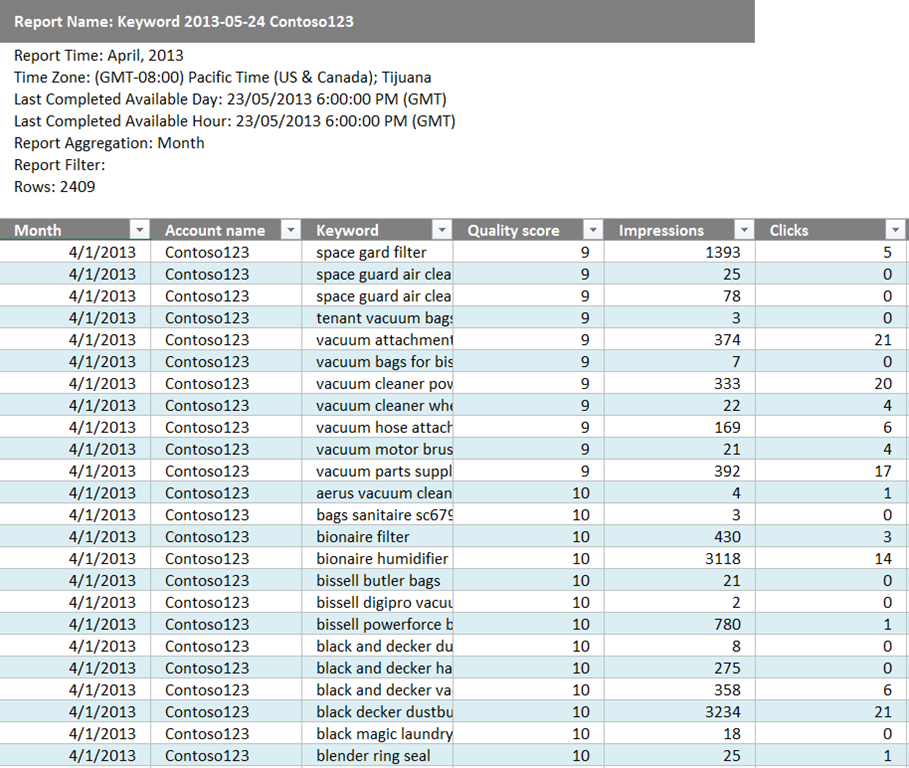
What is exciting is the fact that upon downloading to Excel, reports are already formatted and set with column filters for easy sorting and pivot table and chart creation.
There’s no need to waste precious time tinkering with basic formatting — deleting rows here, adding rows there, setting filters – after each download in order to get reports ready for actual analysis.
Here’s an example of what an Excel report looks like upon download from Bing Ads:
Bing Ads New Excel Download ReportTo download reports to Excel, set the Format field to “Excel” in the dropdown menu when in the Reports center.


Reference          :- http://searchengineland.com

EBriks Infotech :- SEO Company India   SMO Company India     PPC Company India

Address              :- E-171,Sec-63 Noida(UP) India-201301 


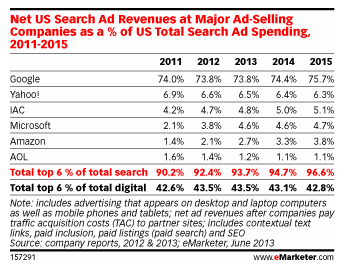
Microsoft Search Ad Revenue Estimates Get Major Downgrade; Google Retains 74% U.S. Market Share [Report]

eMarketer has issued a major revision to its predictions for Microsoft’s U.S. search ad revenue. The latest estimates peg Microsoft net search ad revenue at $660 million last year and $890 million this year, down substantially from the previous estimates of $1.41 billion last year and $1.84 billion expected this year.
The downgrade is based on eMarketer’s assessment of Microsoft’s likely traffic acquisition costs (TAC), which appear to be substantially higher than previously estimated. The new revenue projections slice Microsoft’s U.S. market share in half, from 9.3% to just 4.6%, due to the additional costs Microsoft is expected to pay its ad partners.
eMarketer US Search Ad Market Share Growth Estimates
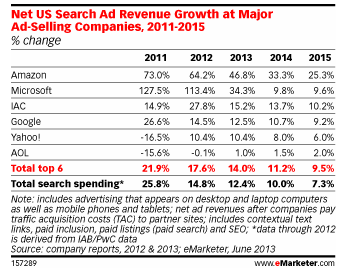
Yet, even with this revision, Microsoft is expected to grow ad revenues by 34.3 percent.  Microsoft held the fastest growth rate in both 2011 and 2012, and this year it is second only to Amazon, which is expected to grow 46.8% this year.
eMarketer US Search Ad Revenue Growth EstimatesGoogle’s overwhelming dominance remains firm. Revenue estimates rose slightly to $14.39 billion this year. The company’s market share is only expected to increase, from 73.8% to nearly 76% by 2015.
Yahoo revenue is predicted to grow slowly, but the company holds its second-place spot in market share behind Google with revenues reaching $1.15 billion this year and growing to nearly $1.5 billion by 2015.
Overall, the U.S. search advertising market is set to hit nearly $19.49 billion this year, up 12.4% over 2012.

Reference          :- http://searchengineland.com

EBriks Infotech :- SEO Company India  SMO Company India  PPC Company India

Address              :- E-171,Sec-63 Noida(UP) India-201301


Monday, 3 June 2013

10 Killer SEO Landing Page Tips

landing-page-engage-beyond-the-click
When we talk landing pages, most online marketers think pay-per-click, where the input of a destination URL into Google's or Bing's paid search offerings allow marketers to drive keyword-targeted traffic to (hopefully) optimized pages.
My previous article extolling the death of keywords talked about developing intent-based topics and building content that connects with those topics – intent to content.
We can now apply that mantra in a "first engagement" scenario, after a user clicks a search result, to ensure SEO landing pages:
  • Connect with intent: Offering a user what they expect.
  • Resolve (initial) user query: Answering their initial query.
  • Engage the user: Sending user signals to search engines.
  • Drive further user engagement (if necessary): Additional signals to both users and search engines.
A searcher intent to site content engagement scenario I call "CRED".
In these scenarios where signed in users, search query modification, Chrome browsers, "cookied" users and toolbar data provide massive datasets of engagement signals to search engines on how users interact on sites, we need to drive optimal engagement scenarios.
Here's a checklist of 10 "killer" tips to ensure you're able to add a bit of CRED to your SEO campaigns, as well as demonstrate campaign success!

Connecting

1. Are the primary headlines aligned with intent?

The first thing users notice is content structure, headlines, headers, bolded elements, graphics etc. Your 2 seconds of opportunity to grab attention begins with a mental assessment that needs to immediately connect with the original search query and inspire additional engagement via clear communication of what the page is about.
Content should be created with specific intent in mind, with headlines, and/or graphic headers that are obvious, short, surrounded by adequate white space. And the content must be specific enough to inspire a user's attention.

2. Are you matching content type with query intent?

If the target query includes "how to", "best", "top 10", "compare" or other intent refining modifiers, or if the query demands a certain level of text content, are you obviously offering something that visually connects, confirms relevance, displays lists, video or images?
Users won't have time to read, but they will make a quick decision on whether the format they review matches an expectation. For example, a query on top 10 bars should have a list with numbers displayed – or one entry with numbers. Or a query on the history of search should probably have an index and look robust – not just a 200 word paragraph.
Users have short attention spans, and most have a preconceived expectation of what they should find, not matching that initial expectation can equate to a quick "back click.".
ask-men-insurance
Query for "best health insurance plans for single men". Ask Men offers a clear header and an image that immediately screams "authority"

Resolving

3. Can users perform a quick scan above the fold to answer who, what, and why?

As noted above, users don't actually read on a first pass, they make a decision based on visual cues and click expectations (what they expect after they click).
Some websites fail in obviously reinforcing the click expectation, missing an opportunity for engagement, underscoring brand recognition, and providing obvious reasons of time-worthy value.
Click through to your site and ask the following:
  1. Is your brand obvious?
  2. Is it obvious what you do?
  3. Is it obvious why they should stick around?
Especially important with homepages, but equally important on other SEO landing pages, is ensuring your brand is obvious. Make sure what you do, or how you plan to address the user's intent, isn't buried. Give users obvious information and/or justification to stick around and/or click around is key to moving people to engage further.
home-depot-obvious
Query for "flat head screw driver". Home Depot offers clear branding, white space to highlight product, and additional information that is clearly visible and offers visual cues that the tabs are clickable.
Remember: for instant user assessment of resolution potential, anything below the fold doesn't exist!

Engaging

As noted with the Home Depot example, key engagement options exist such as an "add to cart" action button, search for intent refinement or modification, other options to dig into additional information and links to similar products that other customers have purchased.
Each of these elements contribute to answering the next question:

4. Is it obvious what they should do next?

For Home Depot, the answer is most probably yes. It's easy to find the "Add to Cart" button, it's placed in an obvious position and there's multiple options to view additional information.
The product page offers multiple ways to engage, with a zoom button (subjectively probably not big enough), and plenty of other user-centric options such as writing reviews, checking inventory, etc.
Occasionally there can be too many options that can confuse users. In the Home Depot example there appears to be duplicated "check inventory" buttons/links, but these may have been tested and justified.

5. Are there on-page modification options? (based on query modification)

home-depot-modification
Home Depot offer a good example of obvious search functionality, related products, and other options that can help modify the user's search query onsite rather than have them click back to the search results to modify.
These kind of onsite modifications do not always need to be driven by site search.
Breadcrumbs, side navigation, filters, related prods, color/size selection are all feasible options to mitigate click backs and improve onsite engagement signals.

Driving

6. Are 'next clicks' consistent?

Part of great site engagement is a consistent user experience for similar queries. By monitoring user interaction on a per query basis, website owners can identify consistencies or deficiencies in matches of search intent to site content.
Duane Forrester of Bing said in January 2013:
"In the long run, the brand names secure rankings through depth of content, trust in brand, and user interaction (searchers clicking a SERP result and staying on their site because the site is trusted and answers the searchers question)"
Providing key "next clicks" – obvious steps from landing pages to conversion or core information – is a better user experience = better potential rankability.

7. Can they share what they've found?

Probably the most obvious of tips, it the provision of social sharing and social connection buttons. If landing pages provide the value users expect, will they be inspired to share, and if they are, can they?
Sharing of a page is different than a click through to your social property (i.e., Facebook page or Twitter stream), and should be a key component on most landing pages, with the caveat of audience vs. social platform.
For pages with images, is there an option to share on Pinterest, Facebook, and Twitter? For business text content, is LinkedIn an option? Social signals are imperative in closing the loop on user intent satisfaction, demonstrating to both users and search engines an endorsement of your content.

8. Ultimately, can users find the banana?

Seth Godin published a book a few years ago called "The Big Red Fez" – rather than repeat all the key concepts, I can state simply is it's all about bananas – users finding what they need from obvious choices. There's an excellent synopsis here.
helens-bikes
I love Helen's Cycles, great stores and service. But visit their website and you're presented with way too many choices (red) and a certain level of confusion (green). The green element talks about Helmets, Cycling Essentials and Clothing"¦ but offers no way to click or a link to relevant content.
Give your users clear navigation to improve consistent engagement and "banana-discovery."

Measurement

The final two tips cover justification through measurement of metrics that matter.

9. Have you segmented traffic by topics?

Google Analytics offers segmentation by query topics through Analytics filters (beyond the scope of this article but more information can be found here) or by exporting data and consolidating offline in Excel.
Custom segments allow you to monitor performance across keyword query topics, understand topic traffic and conversion trends, and leverage this data to identify the key landing pages for each topic.

10. Are you tracking first click queries for optimized pages?

Although in an ideal scenario the page you optimize will attract the keyword queries you'd expect, custom segments by topic also offer up insights into competing pages (entry pages in your site that compete against each other), highlighting opportunities to consolidate similar pages, mitigating potential thin content issues and improving topic relevance on merged pages.
Utilize custom segments, organic traffic keyword query reports, together with landing page association to provide insights into potentially competing pages.
rock-genre
Music genre site, with custom "rock music' topic filter applied, highlights the anomaly of "type of rock music" query being mapped to an Anime genre page. Worth investigating why?

Summary

Landing pages have historically been the domain of paid search marketers seeking improved conversion rates.
User experience, site usability, and onsite engagement have become more important for major search engines in their assessment of a site's "rankability", so SEO practitioners need to ensure SEO landing pages have CRED as a key to SEO success.


Reference          :- http://searchenginewatch.com/

EBriks Infotech :- SEO Company India SMO Company India PPC Company India

Address              :- E-171,Sec-63 Noida(UP) India-201301

A 7-Step Landing Page Template to Convert Prospects into Leads

Pay-per-click search marketing may have been invented in the second Clinton administration, but it's a modern iteration of a hundred-year-old tradition of direct marketing: Find people who have a problem, get their attention with a small, inexpensive ad, and then offer them some thing of value related to their problem in exchange for the ability and permission to follow up.
If you're using PPC to generate leads (as opposed to asking your visitors to pull out their wallets on the spot), the landing page is the fulcrum of your efforts; it's where you convert cold prospects into warm leads.
One of the tried and true methods, which all too few marketers employ, is a free report (the B2B version is often called a white paper).
The free report is the tool of choice when your prospect isn't yet educated or motivated enough to take action of any kind. By contrast, the consumer awareness guide works better when the prospect knows they have a problem, knows they need to solve it, and are looking at you and your competitors side by side.
The free report essentially names a problem faced by your prospect, gets them emotionally involved in the horrible current and future consequences of the problem, unveils a generic solution, and then introduces and sells your version of the solution.
Here's a template for free reports that you can adapt to most markets in which your prospects are just becoming aware of the problem and potential solutions.

1. Introduce the Problem

So if you're a computer consultant to small businesses and your front end product is firewall software installation and maintenance, the first thing you need to do in your report is explain what the problem is:
If you've ever downloaded a movie or song from a file-sharing site, you've probably also installed six programs that let outside users access your computer.
Any hacker can exploit these holes in your security to read the entire contents of your hard drive, including confidential client information, your financial reports, your credit card information, and much more. And if you are connected to the internet via cable modem, DSL, or T1 line, then you're vulnerable 24/7.

2. Agitate the Problem

Now, once you explain the problem, you get your prospect sufficiently alarmed about the problem by helping them visualize it and providing case studies, like this:
One of my clients had a hacker break into his network and steal his social security number, home and office addresses and phone numbers, and credit card numbers and expiration dates, all unbeknownst to him. Three weeks later the police were at his office door, leading him away in handcuffs…

3. Describe a Generic Solution

Next, you describe a generic solution (or several solutions) to this problem:
There are many inexpensive and effective tools on the market that can stop most hackers cold. Firewalls prevent unauthorized outsiders from accessing anything on your hard drive. They can also alert you to all attempts by hackers to gain access…
So far you have provided valuable information that could save your prospect untold grief. You haven't sold anything. You've built up a subtle debt of goodwill and trust.

4. Explain Limitations of Generic Solution

Now that you've selflessly shared valuable information, you've positioned yourself as a helpful expert. From here, you can begin to advocate for your product or service. A great way to do this is to explain all the hassles and difficulties with the solution you just described, like this:
But there are so many firewall products on the market, with so many upgrades being announced all the time, that choosing the right one is an overwhelming experience for many computer users.
Also, any system that you choose needs to be configured so that it doesn't prevent you from doing the things you need to do: send and receive email, use the web, share documents, back up and restore files at remote locations, and many others. As your system changes, you'll need to reconfigure the firewall on a regular basis.
No wonder 98% of all small businesses have no protection against hackers whatsoever.

5. Introduce Your Specific Solution

Your next step is to explain how what you do solves all of these problems:
That's why I created the ‘Hands-off, No-brainer, Protect Your Vital Data from Criminal Scumbags' program for small businesses. I come out and install the firewall on your system.
It takes about an hour, but I don't leave until it's running perfectly. I test every conceivable function and make sure there are no conflicts.
I monitor all the upgrades for my clients, and can install them and reconfigure the firewall properties from my office, without any effort or hassle on your part. In fact, unless you check the log file, you won't even notice that anything is different.
You get to concentrate on your work without worrying about the security of your mission-critical and sensitive personal information.

6. Provide Details Through Testimonials

Here is a great place for testimonials from happy clients, with specifics. In those testimonials, you're going to want to address the specific objections that people may have, by having your testimonials start with those objections, and then be convinced by your service.
You're also building a value case for your product, so that when you reveal the price, it will look like a great deal compared to what it's worth:
Dominic installed the firewall on March 3. On March 17, an alert popped up that someone was trying to access our network. We later found out that the office down the hall that shares our T1 line was compromised, and their entire hard drive was wiped out. They've spend the last month scrambling to restore what they can, apologizing to clients, and doing damage control.
They've lost at least $85,000 in business since March, not including the time and aggravation they've put in trying to fix the problem.
Aside from the 45 minute installation and the alert, we haven't even noticed that anything is different. Dominic and his software are completely maintenance-free. And when we call him with a question, he always gets back to us within the hour. Any business that doesn't use Dominic is putting far too much at risk.
Now when you reveal your pricing, let's say $250 for the software package, free installation, and a $500/month maintenance contract, it seems like a giant bargain in comparison.

7. Share a Call to Action and Reduce Their Risk

Finally, tell them what to do next to get started. The smaller the step, the more likely they'll say yes at this point. For example, instead of asking them to sign a contract, offer a free system audit. Or a phone conversation.
Another way to reduce their perceived risk is with a bold guarantee. Explicitly state your guarantee at this point, so it's easier to say yes than no.
Calls to action often benefit from adding urgency, so don't hesitate to ask for a response within a certain time frame. If the supply is limited, use that to compel immediate action. For example:
Because of the personal attention I give my clients, I only take on 50 clients at a time. I currently have 45 slots filled, so I can perform the audit only for the next five clients who contact me.
The landing page has one job: to "sell" the free report. Use benefits and curiosity ("the number one mistake small businesses make when they choose a firewall – page 3") to create an open loop in your visitor's mind that can be closed only by registering for, downloading, and reading the report.
In a competitive market, positioning yourself as the helpful expert is often your most powerful advantage.


Reference          :- http://searchenginewatch.com/

EBriks Infotech :- SEO Company India SMO Company India PPC Company India

Address              :- E-171,Sec-63 Noida(UP) India-201301

5 Ways to Create Productive B2B SEO Benchmarks in a 'Not Provided' World

How do you measure SEO performance now that "not provided" keyword data is so prevalent?
This question comes up frequently in client meetings and conversations with colleagues in the industry.
In some cases, "not provided" keyword traffic percentages represent more than 50 percent of a client’s search referral volume. This creates a significant hurdle when you're trying to demonstrate results for campaign initiatives.
The challenges SEOs face in demonstrating ROI of keyword strategies mirror greater concerns B2B marketers have with website optimization initiatives overall. A recent MarketingSherpa article highlights the fact that more than half (53 percent) of B2B marketers surveyed indicated they couldn't (or didn't) calculate the ROI of their website strategies.
website-optimization-roi-marketing-sherpa
The information is significant because (according to those surveyed) the website accounts for 25 percent of all marketing spending.
Demonstrating ROI is a critical element of marketing performance. B2B SEO professionals would be wise to do their part in the process, which includes being proactive and creative when faced with mounting reporting obstacles such as increased "not provided" traffic.
Here are five recommendations for providing greater performance measurement on B2B SEO programs, impacted by "not provided" traffic percentages.

Landing Page SEO Attribution

The most direct method for evaluating SEO strategies when faced with increasing "not provided" percentages is to track individual landing page performance. In Google Analytics, the first step is to filter "not provided" keyword data by "Landing Page" to get a sense of what content logged in searchers are landing on.
Select the Secondary Dimension "Landing Page":
landing-page-filter-google-analytics
Results show what pages logged-in searchers landed on when finding website information in Google search engine results:
not-provided-landing-pages-google-analytics
This is a critical way you can explain the value of content marketing assets, created to provide visibility for important keyword strategies, and limited by "not provided" search percentages. Landing page attribution helps:
  • Define visitor success metrics of specific pages SEOs created or made recommendations for, by way of traffic, page performance, and (hopefully) goal completion.
  • Set benchmarks for comparing the traffic performance of SEO assets against other traffic referral channels.
While we no longer have complete visibility into the keyword referral types generated by Google users, we can make reasonable assumptions by better analyzing landing page information from those visitors.

SEO Landing Page Navigational Performance

While conversion tracking, in terms of lead volume and conversion rate, are critical benchmarks. However depending on the type of content assets created sales ready leads might be difficult to realize. There is a bigger story SEO campaigns can tell through navigational performance analysis.
In addition to evaluating the specific pages "not provided" searchers landed on, B2B SEO professionals should investigate the paths website visitors take when accessing SEO landing page as well.
In Google Analytics, the "Navigational Summary", found in the "Content" section, provides important performance metrics. This data set can be critical for SEO-specific web pages like blog posts or viral marketing assets, usually meant more so for driving traffic and link acquisition, as opposed to direct leads.
page-navigation-google-analytics
Document the number and percentage of times visitors to jump from this page to a key conversion-oriented page, such as a request for download or request for evaluation type web asset. These types of metrics provide more concrete, immediate evidence that SEO landing pages drive qualified traffic, as well as provide opportunities for keyword visibility and links.

Prospect Page Performance

Lead management and marketing automation systems deliver visitor reports to clients; often daily. These reports usually show the following metrics associated to potential sales prospects, which can be valuable for B2B SEO performance evaluation:
  • Keyword Referral Data: Which keywords the prospect used to access the site.
  • Referral Source: This might be advantageous if we can trace back to link acquisition campaigns.
  • Pages Visited: Critical for establishing whether SEO landing pages are being accessed by prospective customers.
B2B SEO professionals should ensure they are receiving summary reporting data (or access to the lead management dashboards overall) in order to evaluate whether SEO landing pages are being accessed by prospective buyers and what the visitor path was like, start to finish. This type of analysis creates a direct connection between SEO initiatives and lead nurturing programs.

Inbound Link Report

The content marketing assets built for particular keyword strategies should also acquire inbound links, either organically or through direct communication. Inbound link reporting is another way you can overcome gaps in keyword-specific measurement.
google-webmaster-tools-links-domains
Google Webmaster Tools is the first place to look for inbound link information, specific to SEO related content marketing assets. Pay attention to both the domains and total links acquired per content marketing asset developed.
bing-webmaster-tools-inbound-link-reporting-tool
Bing Webmaster Tools also has an inbound link reporting tool and it is interesting to compare differences both search engines have in these reports. They both still provide good metrics for defining the value of SEO related content assets, and the links acquired with them.
Use an independent link tracking tool as well, such as RavenTools Link Manager or even an internally shared spreadsheet. Cross-reference this data with each search engine’s link reports as well, to get a sense of what information the search engines prioritize.

Social Media Mention

Content marketing assets should be designed to be shared in social media platforms as well. While measuring the volume of shares and mentions through various social sites is a good baseline metric, the key is in noting "business significant" social media profiles involved in this process. Examples of business significant profiles might include:
  • Industry influencers
  • Profiles representing solid link building opportunities
  • Target prospects or customers
HootSuite is good for social media communication initiatives, because of the ease of use in tracking mentions, click rates on updates, and influence measurement.
social-media-mention-mizzou
The above screenshot is an example of a university profile we found mentioning one of our clients, and a key opportunity for link acquisition as well as long-term business development (for our client).

Final Thoughts

While this column focuses on the impact of "not provided" keyword data, almost all of these recommendations cover broader SEO performance measurement as well. Digging deeper into the data to uncover successes in SEO is critical for B2B marketing performance measurement, especially for organizations that rely more heavily on organic search.


Reference          :- http://searchenginewatch.com/

EBriks Infotech :- SEO Company India SMO Company India PPC Company India

Address              :- E-171,Sec-63 Noida(UP) India-201301